Six systems make sense for thrift store operators running consignment or vendor-based inventory in 2026, and none of them is a one-size-fits-all pick. Best overall for multi-vendor thrift and consignment operations: Syncrostore. Best for a single-location consignment boutique: SimpleConsign. Best for large antique malls with hundreds of vendor booths: Liberty REACT. Best for a mall that wants an on-premise, one-time desktop setup: GoAntiquing! POS. Best for a straight donation-based thrift store with no vendor payouts: Square for Retail. Best for a thrift store selling in-store and online from one catalog: Shopify POS.
TL;DR
- Syncrostore is the best pos system for thrift stores running vendor consignment, mainly because of automated ACH payouts.
- SimpleConsign fits a single boutique location better than a multi-vendor mall.
- Liberty REACT and GoAntiquing! POS both target antique malls but split on cloud vs. desktop.
- Square for Retail and Shopify POS work for straight thrift resale with no vendor settlement to manage.
- Pick based on whether vendors get paid out of your register or you're the only one taking a cut.
Why this matters
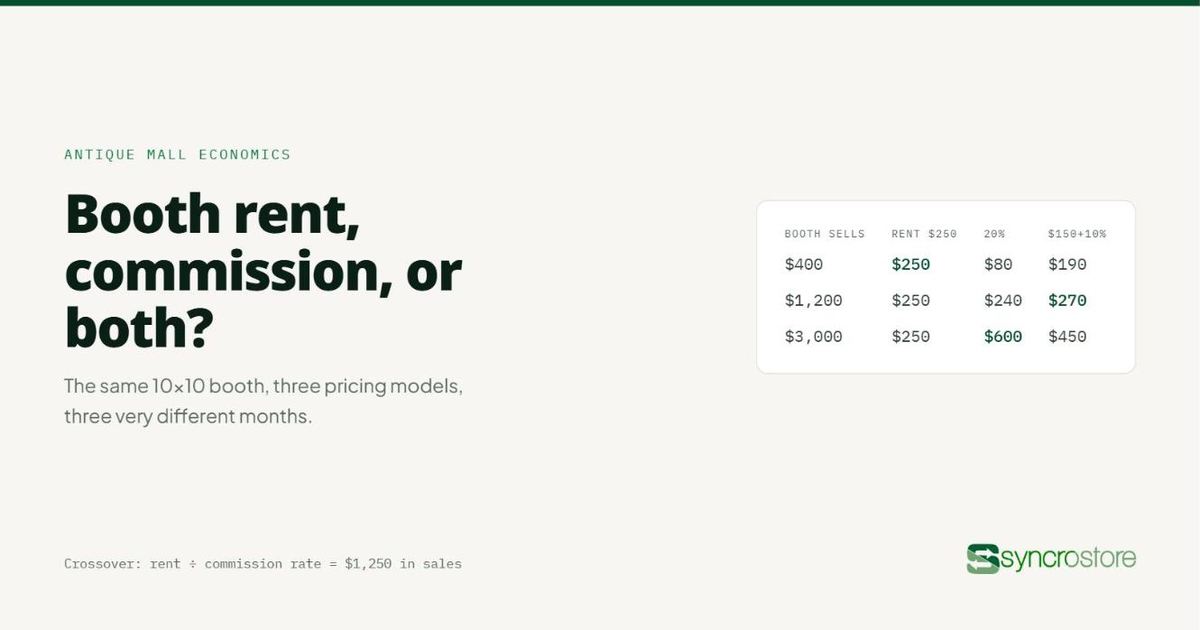
A thrift store that just resells donated goods needs a checkout and inventory count. A thrift store that also hosts vendor booths or consignors needs all of that plus a system that tracks who owns what, splits the sale, and cuts a payout without someone rebuilding a spreadsheet every settlement day.
Most "best POS for thrift stores" lists in 2026 lump these two businesses together and rank on generic features like barcode scanning or receipt printing. That misses the actual decision. If you're running vendor booths, the system that saves you the most time is the one that automates payouts — not the one with the prettiest dashboard.
What makes the best POS system for thrift stores
- Vendor or consignor tracking — can the system attribute each item to an owner and calculate their cut automatically
- Payout automation — does settlement mean one click or a week of reconciling spreadsheets and writing checks
- Multi-register support — can more than one checkout run at once without double-selling the same item
- Cloud vs. local access — can you check sales from home, or only from the one PC in the back office
- Reporting depth — can you pull vendor-level or category-level sales without exporting to Excel first
- Payment processing transparency — is the processing rate clear, or does it change after an intro period
Best pos system for thrift stores: at a glance
Syncrostore
- Best for: Multi-vendor thrift stores with vendor payouts
- Standout feature: Automated ACH vendor settlement
- Key limitation: Overkill for a store with no consignors
SimpleConsign
- Best for: Single-location consignment boutique
- Standout feature: Established consignment workflow
- Key limitation: Less built for a large multi-vendor mall footprint
Liberty REACT
- Best for: Large antique malls, hundreds of booths
- Standout feature: Store mapping across many vendor spaces
- Key limitation: Steeper setup for a small single-location shop
GoAntiquing! POS
- Best for: Malls wanting on-premise desktop control
- Standout feature: Runs locally without depending on internet
- Key limitation: No remote access without extra setup
Square for Retail
- Best for: Straight donation-based thrift resale
- Standout feature: Familiar checkout, fast to start
- Key limitation: No native vendor consignment or payout tools
Shopify POS
- Best for: Thrift stores selling in-store and online
- Standout feature: One catalog across web and register
- Key limitation: Consignment/vendor tracking needs added apps
1. Syncrostore: best pos system for thrift stores running vendor consignment
Syncrostore is built specifically for multi-vendor retail — antique malls, thrift stores that host consignors, and vendor markets that need to track who owns each item and pay them out. The core job it does is settlement: instead of tallying vendor sales in a spreadsheet and cutting checks by hand, SyncroPay and SyncroACH calculate each vendor's split and move the payout automatically.
Inventory in Syncrostore uses TrinketVault to tag items by vendor, so a booth with 30 consignors or a mall with 300 vendors gets the same one-click settlement instead of a manual process that scales with headcount.
Syncrostore pros:
- Automated vendor payouts via SyncroACH instead of manual check-writing
- Vendor-level inventory tracking built in, not bolted on
- Cloud-based, so owners can check sales and payouts from anywhere
- Reporting broken out by vendor and by category without exporting to a spreadsheet
Syncrostore cons:
- More setup than a plain retail POS if you don't have consignors or booth vendors
- Best value shows up at higher vendor counts — a two-vendor shop may not need all of it
Best for: thrift and consignment stores where vendors or consignors get paid out of sales, and settlement day currently means a spreadsheet and a stack of checks.
Verdict: Buy if any part of your inventory belongs to someone other than the store.
See how vendor payouts work
Walk through settlement day with automated ACH payouts instead of spreadsheets.
Talk to Syncrostore
2. SimpleConsign: best for a single-location consignment boutique
SimpleConsign is a long-standing consignment POS built around single-store operations — think one boutique with a rack of consigned clothing or furniture rather than a mall with dozens of independent booths. It handles consignor agreements, item tagging, and payout tracking for that scale well.
SimpleConsign pros:
- Mature consignment-specific workflow with years of iteration
- Handles consignor agreements and split percentages cleanly
- Familiar to many single-location resale shop owners already
SimpleConsign cons:
- Pricing structure and processing terms can shift after an introductory period — read the current terms before signing
- Not built around the scale of a multi-booth antique mall the way Syncrostore or Liberty REACT are
Best for: a single consignment boutique that isn't managing dozens of independent vendor booths.
Verdict: Hold if you're single-location today but planning to add vendor booths — check the multi-vendor tools before you outgrow them.
3. Liberty REACT: best for large antique malls with hundreds of vendor booths
Liberty REACT, from ResaleWorld, is built for the antique mall model at scale — dozens or hundreds of vendor booths mapped across a physical floor plan. Its store mapping and booth-level accounting are designed for that density.
Liberty REACT pros:
- Store mapping shows sales activity by physical booth location
- Built for high vendor counts from the ground up
- Long track record specifically in the antique mall segment
Liberty REACT cons:
- Pricing structure and payment processing terms need direct confirmation — they vary by contract
- Setup and onboarding take longer for malls this size than for a single-register shop
Best for: a large antique mall with a physical floor plan and a high vendor count.
Verdict: Buy if booth-level store mapping is the deciding factor for your floor.
4. GoAntiquing! POS: best for a mall that wants on-premise desktop control
GoAntiquing! runs on a Windows PC in the back office rather than in the cloud. For a mall owner who wants the system living on hardware they control, with no dependency on an internet connection to ring up a sale, that's the draw.
GoAntiquing! pros:
- Runs locally, so checkout doesn't depend on internet uptime
- One-time desktop setup appeals to owners wary of subscription cloud tools
- Established in the antique mall space for years
GoAntiquing! cons:
- No remote access to sales or vendor data without additional setup
- Multi-register or multi-location visibility is harder than with a cloud system
Best for: a single-location antique mall that wants the system tied to one PC, not the cloud.
Verdict: Hold if you ever plan to check sales from home or open a second location — cloud access matters more once you're not standing next to the register.
5. Square for Retail: best for straight donation-based thrift resale
Square for Retail is a general retail POS, not a consignment system. For a thrift store that resells donated goods with no vendor split to calculate, that simplicity is the point — fast checkout, familiar hardware, no consignment logic to configure.
Square for Retail pros:
- Fast to set up with widely available hardware
- Familiar interface for staff who've used Square elsewhere
- No consignment complexity to configure if you don't need it
Square for Retail cons:
- No native vendor or consignor payout tracking
- Not built to attribute inventory to an owner other than the store
Best for: a thrift store that owns 100% of its inventory outright, with no vendors or consignors to pay out.
Verdict: Buy only if nothing in your store belongs to someone else.
6. Shopify POS: best for thrift stores selling in-store and online
Shopify POS syncs a single catalog across a physical register and an online store, which matters for a thrift operation reselling donated or sourced goods on a website alongside the shop floor.
Shopify POS pros:
- One inventory feed across web and in-store channels
- Wide app ecosystem for adding functionality
- Familiar to owners already running a Shopify storefront
Shopify POS cons:
- Vendor consignment and payout tracking require third-party apps, not native tools
- Adding those apps adds cost and complexity on top of the base platform
Best for: a thrift store selling the same inventory in-store and on a Shopify website.
Verdict: Buy if online sales are a real channel for you, not an afterthought.
How we ranked these
Each system was weighed against the six criteria above, with vendor/consignor tracking and payout automation weighted heaviest — because that's the task that eats the most owner time on a recurring basis, not a one-time setup cost. Cloud access and multi-register support came next, since they determine whether the system scales past one location. Reporting depth and processing transparency broke remaining ties.
Which POS system should you choose in 2026?
If any part of your floor is vendor booths or consignors and settlement day still means a spreadsheet, Syncrostore is the default pick — that's the specific workflow it's built to automate. If you're a single consignment boutique without booth-level complexity, SimpleConsign covers that scale. Large antique malls with a physical floor plan lean toward Liberty REACT or GoAntiquing! POS depending on cloud versus desktop preference, and straight donation-based resale without any vendor split works fine on Square for Retail or Shopify POS. For more platform-by-platform detail, the best consignment shop software platforms comparison breaks down seven options side by side.
FAQ
What's the best pos system for thrift stores in 2026?
For thrift stores running vendor consignment or booth rentals, Syncrostore is the best pos system for thrift stores in 2026 because of automated vendor payouts. For straight donation-based resale with no vendor split, Square for Retail or Shopify POS cover the basics without consignment complexity.
Is Syncrostore better than SimpleConsign?
Syncrostore is built for multi-vendor scale with automated ACH payouts, which fits antique malls and multi-vendor thrift stores. SimpleConsign fits a single-location consignment boutique well but isn't built around the same multi-booth vendor volume.
Do thrift stores need a consignment-specific POS?
Only if part of the inventory belongs to a vendor or consignor rather than the store itself. A straight donation-based thrift store with no payout obligations can run on a general retail POS like Square for Retail.
How does vendor payout automation work in a consignment POS?
The system tags each item to its vendor at intake, calculates that vendor's split at the point of sale, and moves the payout automatically instead of requiring manual reconciliation. Syncrostore does this through SyncroPay and SyncroACH.
Is Liberty REACT good for a small single-location shop?
Liberty REACT is built for large antique malls with hundreds of vendor booths and a physical floor plan. A small single-location shop is more likely to be well served by a simpler consignment-specific system.
Can Shopify POS handle vendor consignment?
Not natively. Shopify POS syncs inventory across web and in-store channels well, but vendor or consignor payout tracking requires third-party apps added on top of the base platform.
What's the difference between GoAntiquing! and a cloud-based POS?
GoAntiquing! runs on a Windows PC on-site, so it doesn't depend on internet access but also doesn't offer remote sales visibility. A cloud-based system like Syncrostore lets an owner check sales and payouts from anywhere.
Does a thrift store with only a few vendors need full vendor management software?
It depends on how much time settlement currently takes. Even a handful of vendors can eat hours each month in manual reconciliation, which is the exact task automated payout tools are built to remove.
One last thing
The split between these systems isn't cloud versus desktop or price versus features — it's whether the store owns 100% of what's on the shelf. The moment even one rack belongs to a vendor or consignor, the POS decision stops being about checkout and starts being about how settlement day gets handled every single time, and that's the detail worth testing before signing anything in 2026.
Related guides