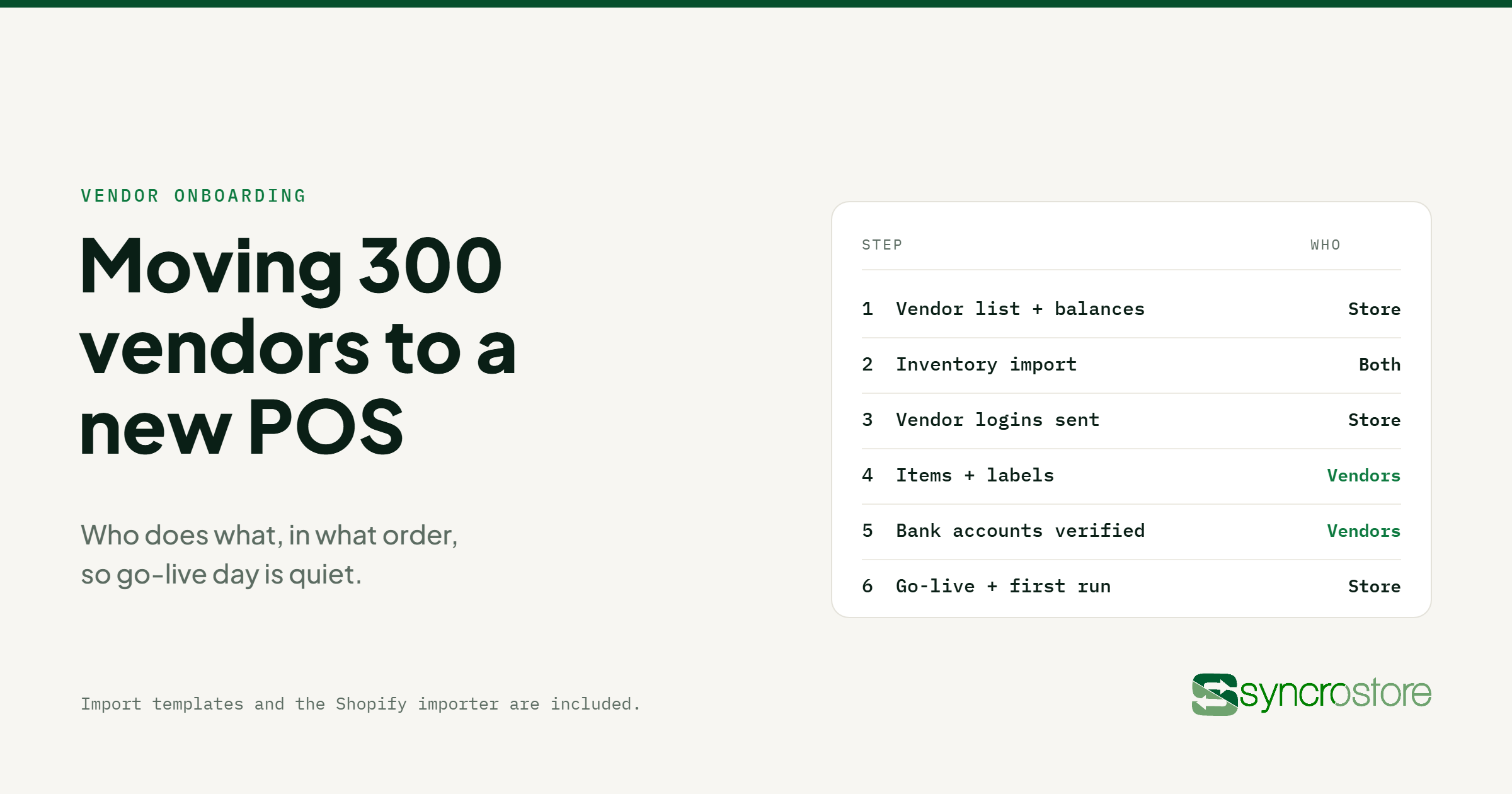
Short answer: the way to move hundreds of vendors to a new POS is to split the work. The store brings the data it already owns: the vendor list, open balances and store spaces. Inventory comes across by import, not retyping. Then each vendor gets a login and finishes their own setup: items, labels and a bank account for payouts. In Syncrostore, the import templates and Shopify importer are included, and most stores go live inside two weeks.
This guide is for multi-vendor stores with a large vendor roster: shop-in-shop stores, boutique collectives and big vendor malls. It walks through the order that keeps go-live day quiet, and what to check before your first settlement.
Why vendor onboarding is the hard part of switching
A single-owner store moving to a new POS moves one catalog. A multi-vendor store moves a small business for every vendor: their products, their rent and commission terms, what they're owed today and how they get paid. Get the balances wrong and your first settlement is the first thing vendors judge you on.
At 300 vendors, the store can't do all of that alone. The plan below gives the store the work only it can do and gives vendors the rest.
Step 1: Get your own data ready
Before anything is imported, pull together what you already have:
- Vendor list. Names, contact emails and the space each vendor rents.
- Terms. Rent and commission for each vendor, including anyone on a special rate.
- Open balances. What each vendor is owed, or owes you, on the day you switch.
- Inventory export. From your current system, or from vendors' Shopify stores.
Clean the list first. Vendors who have left, duplicate records and missing emails are much easier to fix in a spreadsheet than after they're imported.
Step 2: Import instead of retyping
Syncrostore migration covers inventory, vendors, store spaces and vendor balances, with import tools for both the store and its vendors. Import templates and the Shopify importer are included, and we walk you through the first import run on a call.
For stores where vendors sell new product, the Shopify importer matters most. Syncrostore imports Shopify inventory directly, and variants come across as variants, so one product in nine colors stays one product. Vendors who don't use Shopify can use the spreadsheet template.
Step 3: Send vendor logins
Once vendors are in the system, the store creates each vendor's login and sends the invitation. You control each vendor's access, from view-only up to managing their own inventory.
From then on, vendors see their own sales, balance and statements in the vendor portal instead of calling the store to ask. Software questions go to Syncrostore support, not to you.
If a vendor sells in more than one Syncrostore store, each store sets them up separately and sends its own invitation.
Step 4: Let vendors finish their own setup
This is where the workload moves off your staff. With inventory access, vendors can enter their own items and print labels from home, before they arrive, instead of bringing a box to the back office.
Vendors also connect a bank account for SyncroACH™ payouts. Accounts are verified with micro-deposits before any money moves, and there's a one-time $1.37 fee per verified bank account. There's no monthly per-vendor fee on Consignment Pro or Enterprise, so adding your three-hundredth vendor costs the same as your thirtieth.
Step 5: Go live
You pick the go-live date, and Syncrostore works through that day with you. Before you open:
- Check a sample of imported balances against your old system.
- Ring a test sale for a few vendors and check that it lands on the right ledger.
- Print labels from the new system for any items that still need them.
- Remind vendors that only one price should appear on each tag after the switch.
Step 6: Check the first settlement
The first settlement run is the real test. Review it in the settlement view before approving: every vendor's sales, rent, commission and fees are itemized, and exceptions are flagged. Fix anything odd before payouts go out, and vendors will trust the new system from the first statement.
Onboarding several stores at once
Onboarding is included for most stores. Large migrations and multi-building rollouts are quoted, and that quote is often waived. The Enterprise plan adds a dedicated onboarding manager, API access and combined settlements, so a vendor who sells in several of your stores gets one payout. See pricing for plan details.
A checklist for switching a multi-vendor store
- Clean vendor list with emails and spaces
- Rent and commission terms for every vendor
- Open balances as of the switch date
- Inventory export or Shopify access
- Vendor invitations sent, with access levels set
- Vendors' items entered and labels printed
- Vendor bank accounts connected and verified
- Test sales rung for a sample of vendors
- First settlement reviewed before approval
For how the rest of the store runs, see multi-vendor retail POS, multi-vendor POS and vendor mall POS. For what happens when you pay everyone, see our guide to vendor settlements at scale.
Frequently asked questions
How long does it take to move a multi-vendor store to Syncrostore?
Most stores go live inside two weeks. You pick the go-live date.
Can vendors import their products from Shopify?
Yes. Syncrostore imports Shopify inventory directly, with variants intact. Vendors who don't use Shopify can use the spreadsheet template.
What data does Syncrostore migrate?
Inventory, vendors, store spaces and vendor balances, using import tools for the store and its vendors.
Do vendors have to come into the store to set up?
No. Once the store sends their login, vendors with inventory access can enter items and print labels from home.
Is there a fee for each vendor?
There's no monthly per-vendor fee on Consignment Pro or Enterprise. The only per-vendor charge is SyncroACH™'s one-time $1.37 when a vendor's bank account is connected for payouts.
Does onboarding cost extra?
Onboarding is included for most stores. Large migrations and multi-building rollouts are quoted, and that quote is often waived.
How many vendors are you moving? Book a 30-minute demo and we'll map out the switch for a store your size.