Short answer: once a multi-vendor operator runs more than one store, the hard part isn't the registers. It's the books. Every store has its own vendors, rent, commissions and settlements, and some vendors sell in more than one of your stores. Running several stores on one set of books means one system for every location, reporting you can compare across stores, stock that can move between stores, and one payout for a vendor who sells in several of them. In Syncrostore, that's the Enterprise plan.
This guide is for operators with two or more multi-vendor stores, or planning a second: shop-in-shop and boutique collective groups, vendor mall operators and franchised vendor markets.
What goes wrong when each store runs on its own
- Reporting. You compare stores by exporting each one and adding them up in a spreadsheet.
- Vendors in several stores. A vendor who sells in three of your stores gets three payouts and three statements. If they owe rent in one store, you may still pay them in full from another.
- Moving stock. Moving a vendor's product from one store to another means removing it from one system and re-entering it in another.
- Setup. Every new store becomes a new software project, with its own imports and its own training.
What "one set of books" should mean
For a multi-vendor operator, one set of books isn't just one login for the owner. It should mean:
- Every store runs on the same system, with the same vendor ledgers and settlement rules.
- You can see each store on its own and all stores together.
- Inventory can move between stores without being re-entered.
- A vendor who sells in several stores is settled once, with what they owe in one store netted against what they sold in another.
- Your own systems can connect to it when you need them to.
How Syncrostore Enterprise runs several stores
Enterprise is Syncrostore's plan for operators running several buildings or franchised vendor markets. It's a custom annual agreement, and it includes:
- Several buildings on one set of books. Every store runs on the same platform.
- Consolidated reporting across every location. Compare buildings in reporting instead of adding up separate exports.
- Per-store and roll-up vendor performance. See how vendors do in one store or across all of them.
- Cross-store inventory transfers. Move stock between your stores.
- Combined settlements. One payout for a vendor who sells in several of your stores.
- Metered API access. Connect your own systems.
- A dedicated onboarding manager and account contact.
Combined settlements: one payout per vendor
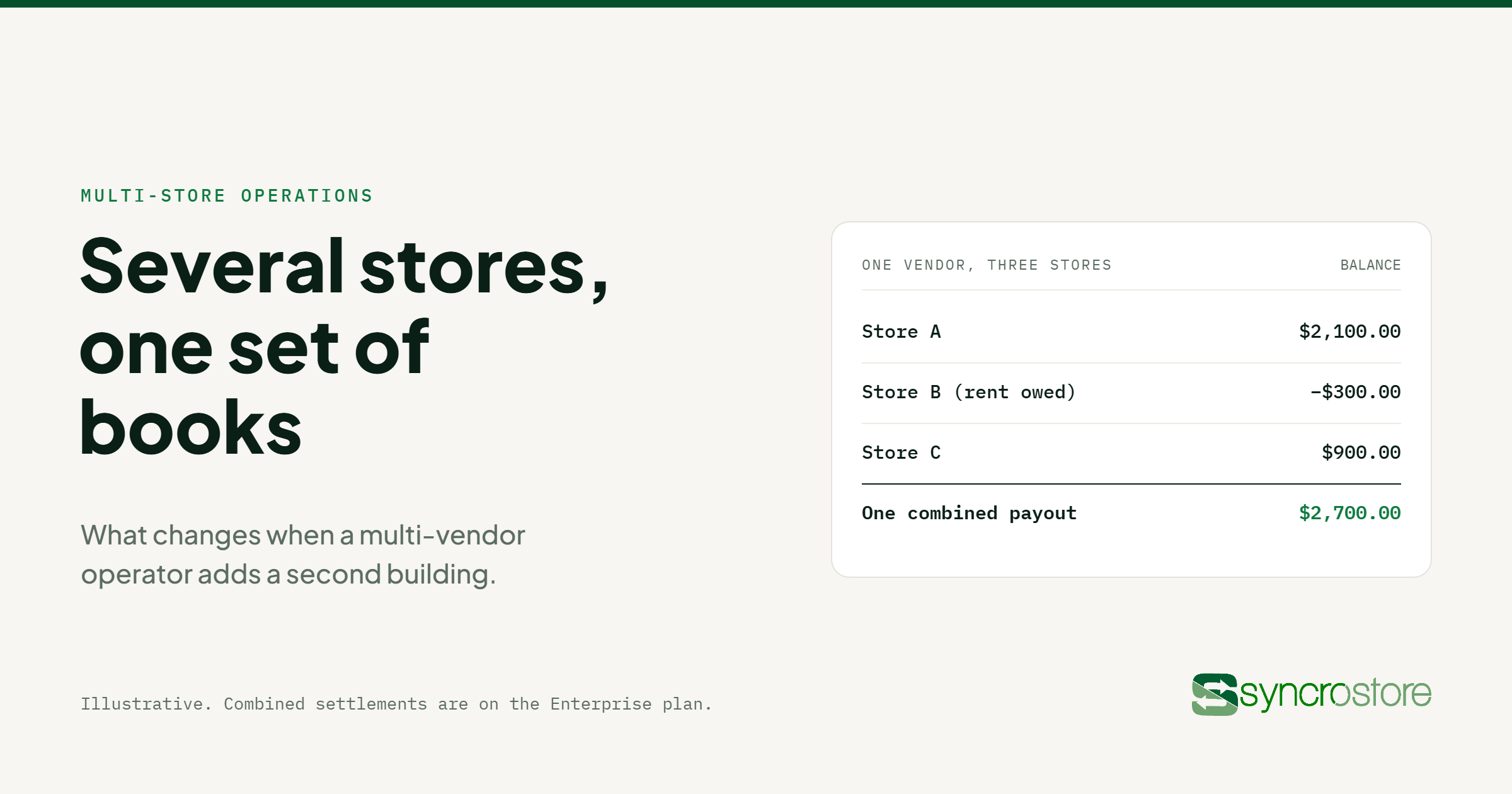
Without combined settlements, each store settles each vendor on its own. With them, Syncrostore combines a vendor's settlements across your stores into one deposit or check, netting what they owe in one store against their sales in another.
Illustrative example. Real balances depend on each vendor's sales, rent and fees.
| One vendor, three stores |
Balance this cycle |
| Store A |
$2,100.00 |
| Store B (rent owed, no sales yet) |
−$300.00 |
| Store C |
$900.00 |
| One combined payout |
$2,700.00 |
Paid separately, that vendor would receive $3,000 from two stores while still owing you $300 in the third. Combined, they get one payout of $2,700, and the rent is settled. The vendor gets one deposit to track, and you pay one payout fee instead of two. See vendor settlements at scale for how a settlement run works.
What stays per store
Each store still keeps its own vendors, rates and settlement run. Today, vendors get a login from each store they sell in, and each store sends its own invitation. Rent and commission can differ from store to store, so you can price a busy location differently from a newer one.
Rolling out several stores
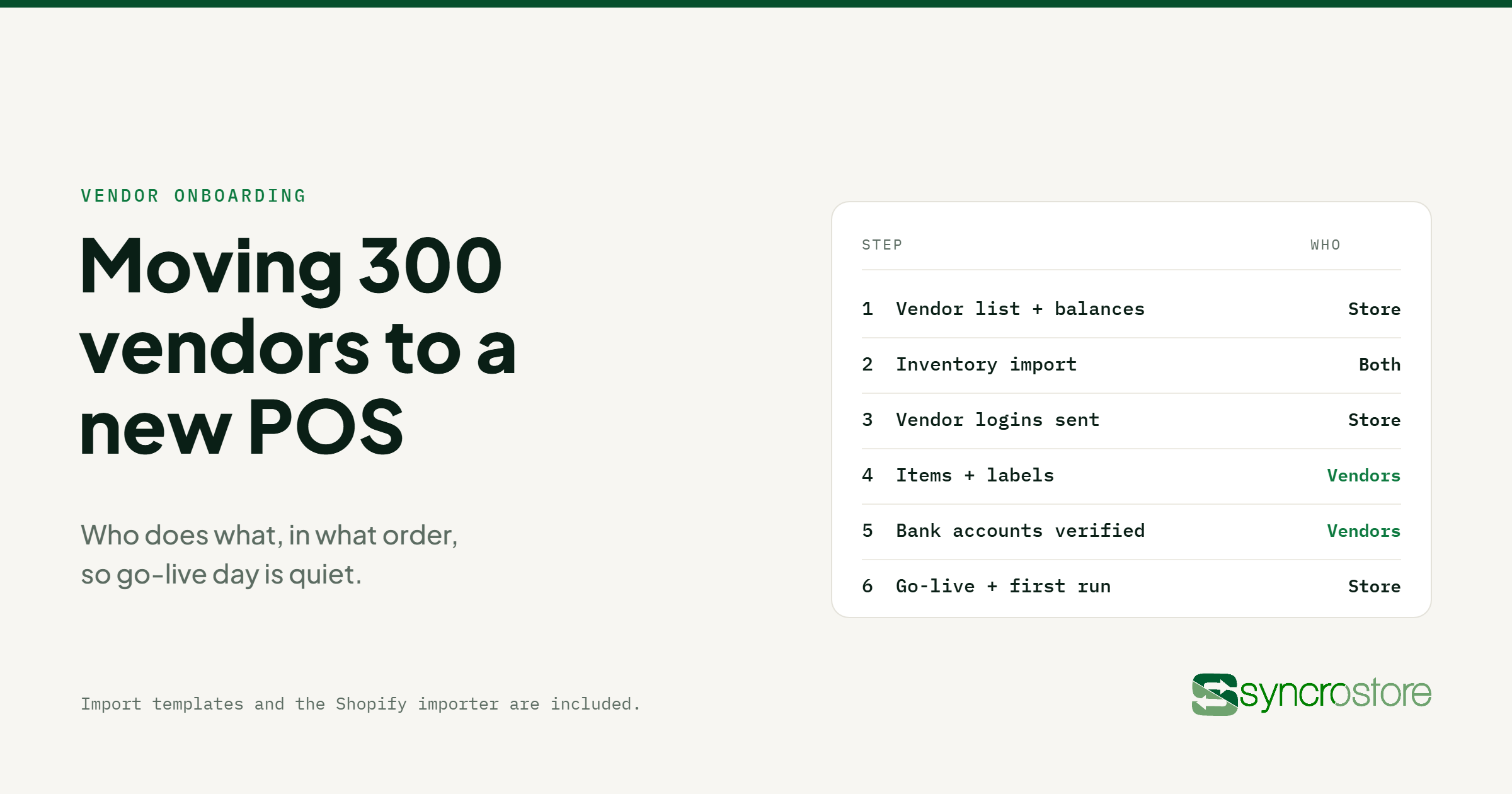
Onboarding is included for most stores. Large migrations and multi-building rollouts are quoted, and that quote is often waived. Enterprise includes a dedicated onboarding manager, and import templates and the Shopify importer are included. For the step-by-step plan, see how to move hundreds of vendors to a new POS.
Questions to ask any multi-store POS
- Can I see every store's numbers together, without exporting each one?
- Can I see a vendor's performance in one store and across all stores?
- Can I move inventory between stores without re-entering it?
- Does a vendor in several stores get one payout, with balances netted?
- Can each store keep its own rent and commission rates?
- Is there API access to connect my own systems?
- Who manages the rollout of each new store?
For how each store runs day to day, see multi-vendor retail POS, multi-vendor POS and vendor mall POS.
Frequently asked questions
Can Syncrostore run several multi-vendor stores?
Yes, on the Enterprise plan. Several buildings run on one set of books, with consolidated reporting, cross-store inventory transfers and combined settlements.
What is a combined settlement?
It's one payout for a vendor who sells in several of your stores. Syncrostore combines their settlements into one deposit or check, netting what they owe in one store against their sales in another. Combined settlements are Enterprise only.
Can each store have its own rent and commission rates?
Yes. Each store keeps its own vendors and rates, so a busy location can be priced differently from a newer one.
Can I move inventory between stores?
Yes. Enterprise includes cross-store inventory transfers.
Do vendors get one login for all my stores?
Not yet. Today, each store sets up its own vendor login and sends its own invitation.
How much does Enterprise cost?
Enterprise is a custom annual agreement, set up with you around your stores. Book a demo to talk it through.
Running more than one store, or planning to? Book a 30-minute demo and we'll walk through how your stores would run on one set of books.